Freshservice Directory Sync

This application is designed to help synchronize Freshservice user directory with a list of company employees.
You must be an IT administrator to access the application.
Please sign in with Google to get started.
You are not a registered Freshservice administrator, you don't currently have permission to use this app.
If you believe you've got this message by mistake, please submit a ticket to request access.
-
Requesters
Retrieve full employee directory from BambooHR and generate a CSV file ready to import to Freshservice.
Start with pressing this button. This operation doesn't change any data in Freshservice.
Missing Data
Update records in BambooHRHow to import Requesters
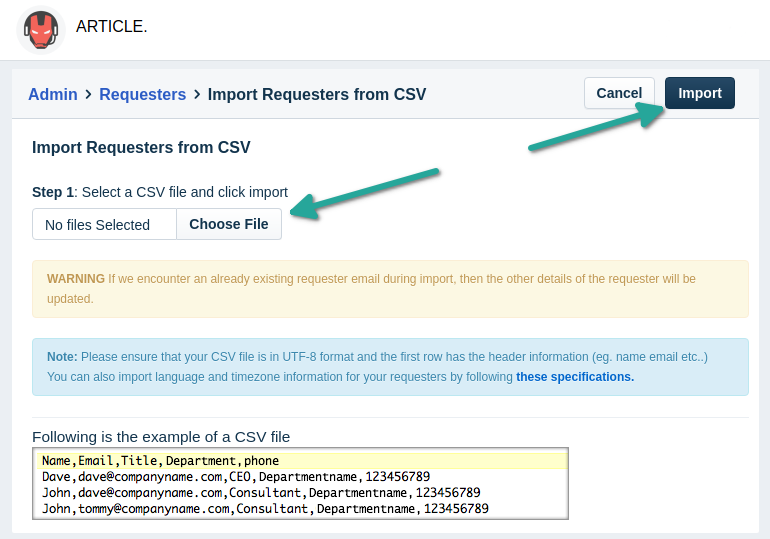
- Download the CSV file.
- Go to the Import Requesters page in Freshservice.
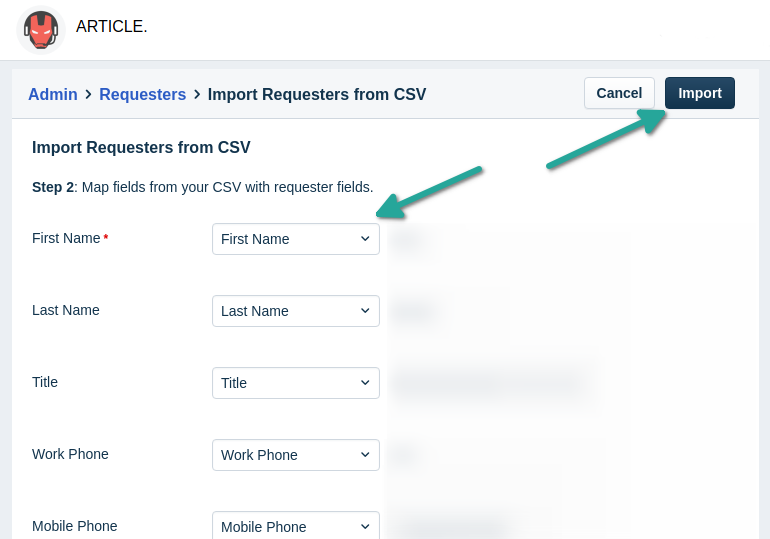
- Map fields from your CSV file with requester fields. Note that the names of the fields are the same.
- Press the Import button.
- Get the confirmation email and see if there were any errors during the import process.
-
Departments
Get the list of departments from BambooHR.
Start with pressing this button. This is a safe operation, no data will be deleted.
Select the head of each department.
Double-check all the heads of departments are listed correctly, then click the button to update departments in Freshservice.